Need a faster way to reply to messages on your Facebook page?
Customers nowadays expect quick answers. When replies take too long, it could cost you sales. This means that handling every chat manually isn’t the most practical way to go anymore, especially when your team is already juggling other tasks.
Smicos makes it easy to automate conversations, answer common questions instantly, and keep your page responsive—all without needing a background in coding. Whether you're running a small business or managing multiple pages, setting up your chatbot takes just a few minutes.
In this article, we’ll show you exactly how to set up your Smicos chatbot on Facebook, step-by-step, so you can start responding smarter and faster.
Why Use a Facebook Chatbot for Business?
Chatbots help reduce response time, improve consistency, and keep leads engaged. For businesses, this means smoother interactions and higher satisfaction. Smicos makes the setup process easier with features like smart replies, 24/7 automated messaging, and a unified inbox for message management. Whether you're handling product questions or capturing leads, using a chatbot on Facebook can lighten the load and scale conversations.
Step-by-Step Setup Guide Using Smicos
Step 1: Open Smicos and Access StoryMaker
Log in to your Smicos dashboard and navigate to the side panel. Select StoryMaker to start creating your chatbot flow.
Step 2: Choose a Template with Smicos Wizard
Select Smicos Wizard for a guided setup that offers customized chatbot templates based on your answers. Alternatively, choose Create My Own to build from scratch or use a pre-made template. After customizing, click the Save button on the upper-right panel, enter a project title, and confirm.
Step 3: Integrate Facebook and Messenger
Click the Integrations button in Smicos. If you have not linked any platforms yet, select Add Integration. Choose Facebook & Messenger and log in with your Facebook Business credentials.
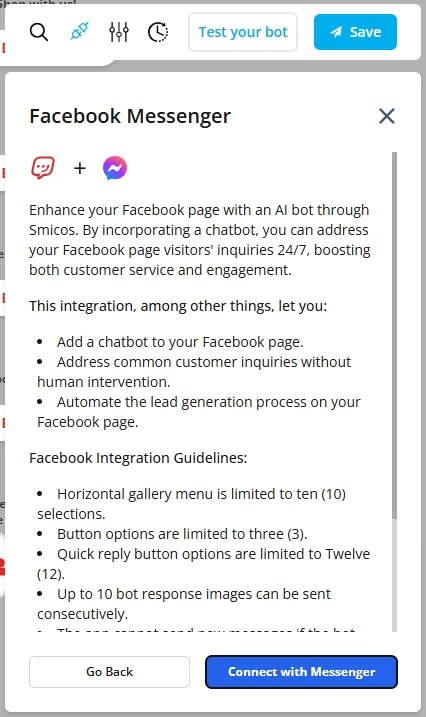
(Sample integration: Smicos x Meta Messenger)
Smicos will automatically connect the integration, enabling automated messaging, real-time engagement, and seamless support across both channels. Confirm the setup by checking your Facebook page.
Step 4: Test and Publish
Preview your chatbot to ensure all responses work as expected. When satisfied, click Publish to activate the chatbot on your Facebook page and Messenger.
Tips for Customizing Your Chatbot
Once your chatbot is integrated, focus on optimizing it for real conversations. Business owners often ask how to set up a chatbot on Facebook that actually delivers results, not just responds.
Here’s how to make your Smicos chatbot more functional and effective:
- Start with high-volume questions. Use the Smicos builder to add replies for store hours, order status, product info, and contact options.
- Use smart keyword triggers. Set phrases like “track order,” “available sizes,” or “return item” to trigger relevant responses instantly.
- Structure replies clearly. Instead of long messages, use simple instructions to guide users through options.
Schedule response variations. Set different replies for business hours, weekends, or promotions.
If you're wondering how to use a chatbot on Facebook to improve service, think of it as your first responder. It should handle routine questions fast while offering an easy path to live support when needed.
And for those asking how to create a chatbot in Facebook, Viber, WhatsApp, and other major communications platforms, you can read a simple, easy-to-follow guideline here.
Try Smicos Today
Smicos makes Facebook chatbot setup quick, simple, and scalable. If you're looking to improve your page’s response time and make message handling easier, it's time to give Smicos a try.
Setting up a chatbot on your Facebook page is now easy with Smicos. Visit our website for a FREE demo and a personalized one-on-one session to help you explore the best Smicos features and solutions for your business!